



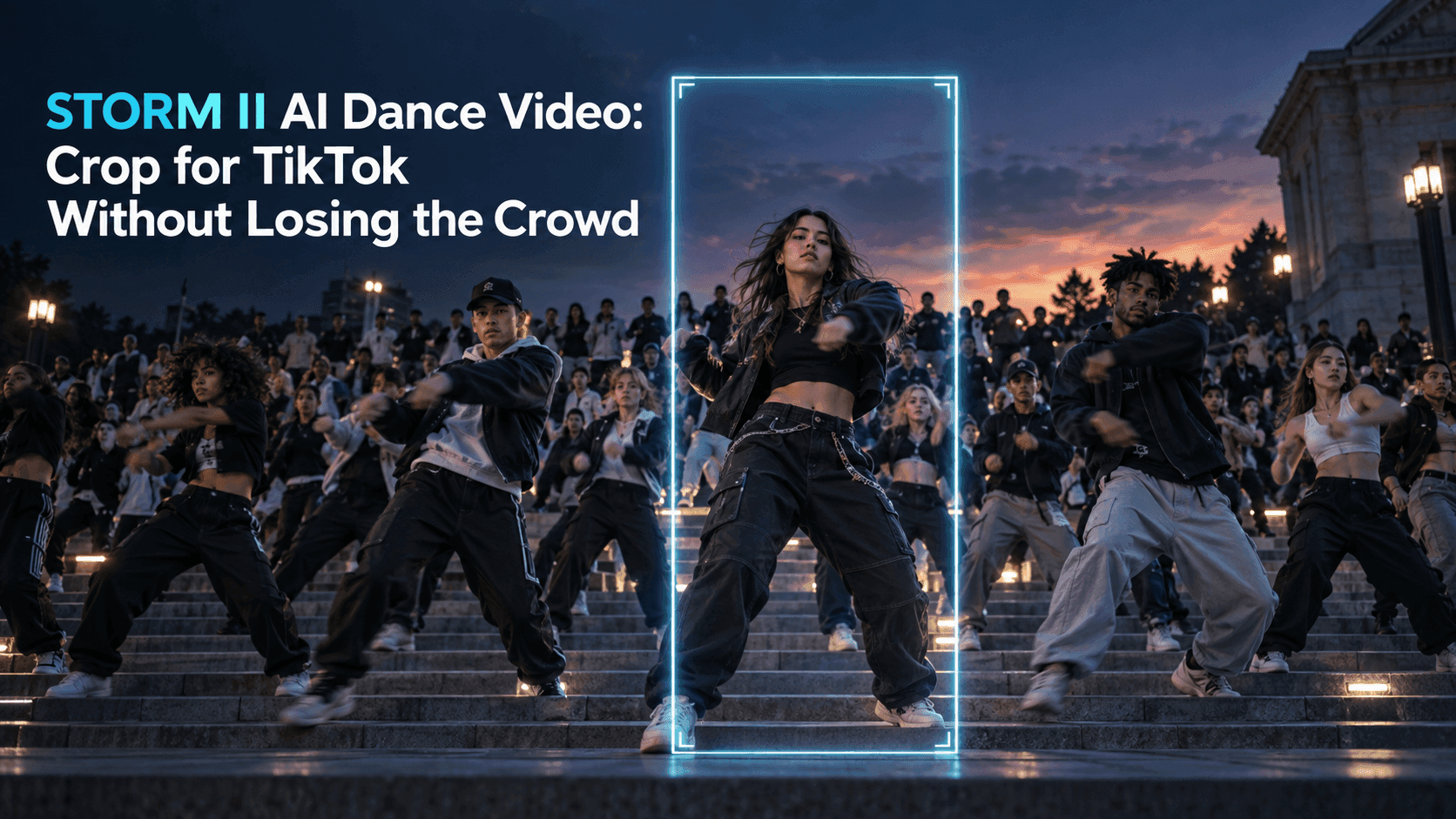
STORM II AI Dance Video: Crop for TikTok Without Losing the Crowd
STORM II AI Dance Video: Crop for TikTok Without Losing the Crowd
The person in the middle hardly moves. Around them, a whole group bends and rises together. You understand the joke before you know whose face is in the shot. Then someone crops the clip for TikTok, and half the dancers disappear. What remains is a close-up of a calm person with a few blurred shoulders at the edges.
That is the problem with cropping a STORM II AI Dance Video. The lead matters, but so does the scale of the reaction around them. If the crowd vanishes, the video loses the contrast that made it worth sharing. A vertical frame can still work. It just needs a plan before you drag a crop box over the middle.
STORM II AI Dance Video: Why the obvious crop fails
The group-dance image is wide by design. One figure anchors the center while rows of people move across the frame. In a typical 16:9 clip, there is room for the formation to spread on both sides. A 9:16 TikTok frame is tall and narrow. If you fill that frame from a wide clip without shrinking the image, you retain only about a third of the original width.
That number explains why a centered crop can look strangely quiet. The main person survives. The outer rows, where you read the movement as a shared action, do not. You may also lose the building steps or floor lines that show how many people are there. The result is not merely smaller; it tells a different story.
Watch the clip once without touching the edit controls. Notice the first moment when the crowd appears to move as one. Freeze that frame. The people you need to preserve may not be the dancers closest to the lead. Sometimes it is the matching arms farther out that make the formation legible.
Start with the format the template actually offers
Before making an export, open Reveedo’s STORM II template and check the current aspect-ratio options. If a vertical option is available for the version you are using, preview it before deciding you need to crop a wide result. A vertical composition made at generation time may arrange the people differently from a narrow slice taken afterward. Compare the two instead of assuming one will always look better.
If you already have a wide clip, keep the original file. Make a separate vertical edit. That sounds obvious until you crop, overwrite the source, and discover that a dancer’s arm or the edge of the formation was important after all. Keeping the wide version also lets you try more than one framing without generating the scene again.
Do not stretch the wide frame to fill a tall canvas. Faces become narrow, bodies look oddly long, and the coordinated movement becomes harder to follow. Cropping, scaling, or placing the complete clip inside a vertical layout are different decisions. Stretching is usually just a distortion.
Give the crowd a few seconds of full width
One practical edit starts with the entire wide shot inside a vertical canvas. The clip sits across the middle; the space above and below can use a plain color or a softly blurred extension of the footage. Avoid a busy mirrored background. It competes with the dancers and can make extra-looking arms appear at the sides.
Let the viewer see the whole formation for the first beat or two. Then cut to a closer vertical view of the lead and the nearest dancers. In a STORM II AI Dance Video, the opening establishes how big the group is. The tighter shot lets people recognize the person you put in the middle. You are not trying to show every dancer at full size for the entire video; you are giving viewers enough information to understand what the crowd is doing.
There is a trade-off. On a phone, a wide inset makes faces smaller. If the lead is already tiny in the original, a long inset will feel distant. Use it briefly, at the moment when the formation is easiest to read, and move in afterward.
If you crop in, follow the formation rather than every face
A moving crop can help when the strongest action travels across the scene. Start with the lead near the middle of the vertical frame. As the dancers on one side rise or sweep their arms, shift the frame slightly in that direction. Return before the central person slips out of view.
Keep the movement modest. A crop that swings from left to right on every beat makes the audience chase the edit instead of watching the dance. Automatic subject tracking may do the same thing when it jumps between faces. For this clip, a steady center with one deliberate adjustment is often easier to watch than constant reframing.
Check the top and bottom of the frame as well as the sides. The crowd’s bend and rise need vertical space. Crop below the knees and you may lose the force of the movement; crop too tightly above the heads and everyone seems boxed in. A little of the steps or ground gives the action weight.
Let the TikTok interface have its space
The edit can look clean on your computer and cramped in the posting screen. TikTok places controls and account information over the video, and captions can cover the lower portion. Leave the lead’s face and the clearest part of the crowd away from those areas. Do not rely on a fixed number of pixels: preview the post in the app you will actually use, since interface layouts and devices vary.
If you add a line of text, make it about the person in the middle, not a description of the choreography. “Me while the group chat plans a trip” gives the stillness a reason. Put the line where it will not cover the lead or the dancers who reveal the scale of the crowd. Check the result with the sound off too. The visual should still make sense without a particular track.
Before using music, check what your posting account can use and what is actually in the exported file. A song associated with a trend is not automatically licensed for every upload, especially a commercial post.
The final phone test
Make two short versions: one with the full formation shown briefly, and one with a closer crop throughout. Watch both on a phone at normal size. Do not pinch to zoom. Can you recognize the lead? Can you tell, within a second, that a crowd is moving together? Does the motion still read after TikTok’s interface appears?
If the close version shows only three shoulders, use the wider opening. If the wide version reduces the lead to a dot, shorten that opening and move closer sooner. A STORM II AI Dance Video works because one person is still while everyone else moves. The right crop keeps both halves of that sentence on screen.