



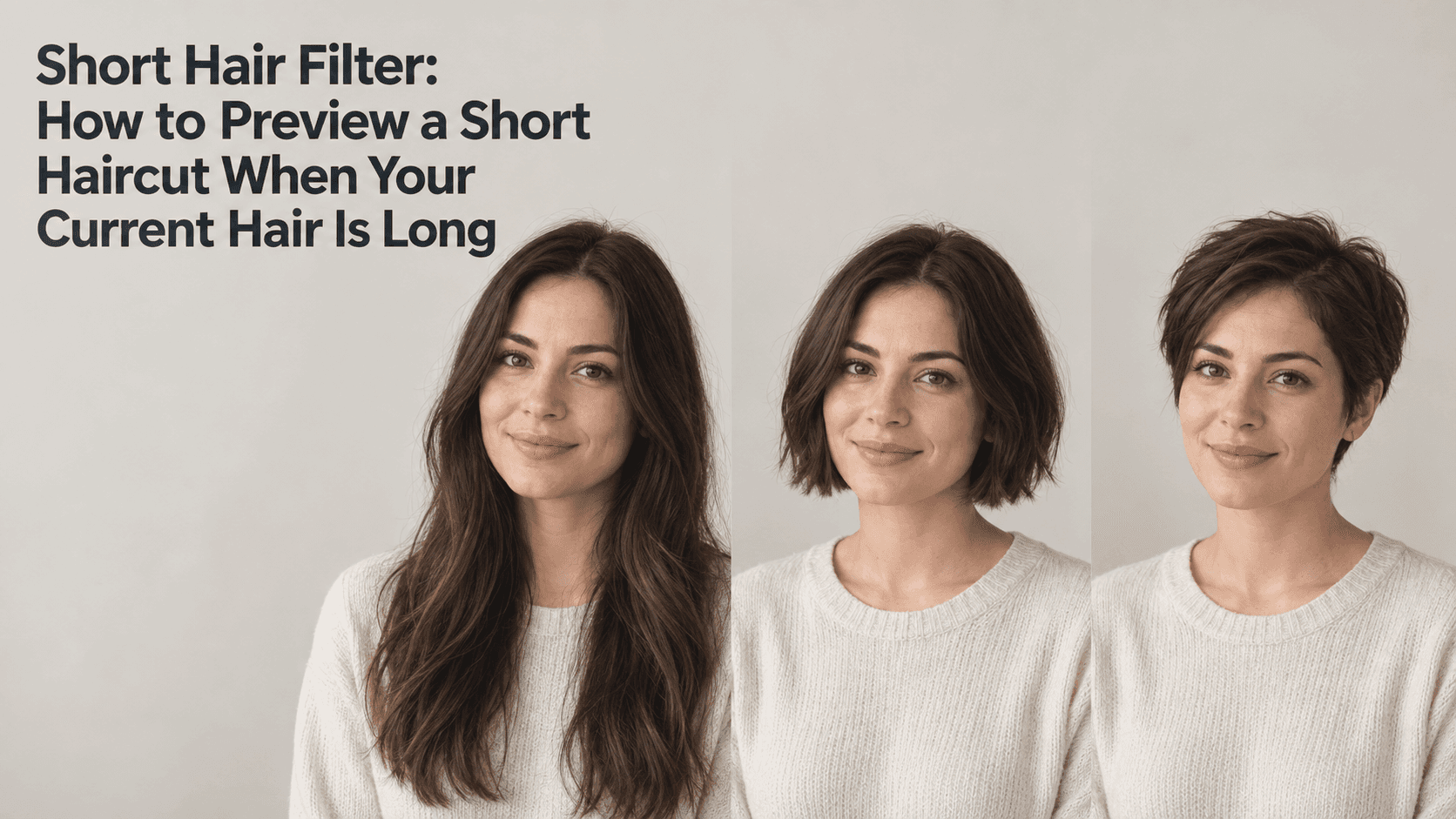
Short Hair Filter: How to Preview a Short Haircut When Your Current Hair Is Long
Short Hair Filter: How to Preview a Short Haircut When Your Current Hair Is Long
You have long hair now, but you keep wondering what you would look like with a bob, a crop, or a pixie cut. A short hair filter can give you a first look using a photo you already have. It is not a promise of what a real haircut will look like; it is a way to narrow down the shapes you want to discuss before you make a change.
The tricky part is that long hair hides the very areas a short cut reveals: your ears, neck, jawline, and the back of your haircut. A useful short hair filter preview should help you picture those changes while keeping your face and age looking like you.
Choose a Photo That Works with a Short Hair Filter
Start with a recent portrait where your face is clear and the hairline is visible. A front-facing or slightly angled photo is usually easier to compare than a dramatic side view. Soft, even light helps you see the outline around the cheeks and neck without deep shadows changing the apparent shape of your face.
If your hair falls across your cheeks or covers your ears, gently move it behind your shoulders before taking a new photo. Do not pull it tightly back if that is unlike your normal look. The aim is to give the short hair filter a clear view of your features, not to create a different portrait. That small bit of preparation can make a short hair filter result easier to assess.
Avoid hats, heavy beauty filters, and strong backlighting. If you wear glasses, keep them on. If your hair is curly, wavy, or very straight, use a photo that shows its usual texture. Those details affect the overall impression of a short style, and a short hair filter preview is more useful when it starts from a picture that resembles your everyday appearance. For the same reason, use the same source photo each time you run a short hair filter.
Decide Which Short Length You Want to See
“Short hair” can mean several very different cuts. A chin-length bob still frames the face. A cropped cut leaves more of the ears and neck visible. A pixie cut changes the outline more dramatically and may expose the hairline around the temples.
Before you open a short hair filter, pick two or three lengths you are genuinely considering. A short hair filter is easier to use when you know which length you want to compare. If you try a very long bob, a blunt bob, a pixie, bangs, and a new hair color all at once, you will not know which change you liked. Start with the shape: bob, crop, or pixie. Compare color later if it still matters.
Reveedo’s hairstyle tool lets you upload a portrait, choose from available styles, and create previews. Options such as a bob or pixie can give you a starting point. Look at the closest styles available, but remember that names do not always describe one exact salon cut. A preview is a visual reference to bring into a conversation with your stylist. Treat the short hair filter as a way to describe a direction, not as a final haircut plan.
Compare One Cut at a Time
Use the same original photo for each version. Keep your face, expression, clothing, background, and hair color steady while you compare the length. This makes the short hair filter easier to judge: if the face changes between versions, you may end up reacting to the edit instead of the haircut.
Save each result with a plain label, such as “chin-length bob,” “short layered cut,” or “pixie.” Put the images side by side at the same size. A large pixie preview can feel more dramatic than a small bob thumbnail simply because it is easier to inspect.
Look at the outline first. Does the bob stop at the chin or below it? Does the crop look soft around the ears, or sharply edged? Does the pixie leave enough length on top for the way you normally style your hair? A short hair filter can help you notice these preferences before you try to explain them at an appointment. Use the short hair filter to compare the outline, not to decide that a certain cut is objectively best.
Then compare the face with the original. Check the jaw, cheeks, ears, and neck. If the tool has changed your face shape or skin along with the haircut, set that version aside. It may look polished, but it is not a fair preview of how the shorter length might suit you.
Remember What the Photo Cannot Show
Long hair can cover parts of the head and neck that are not visible in the source image. When a short hair filter removes that hair, it has to create a plausible outline for the ears, neck, and sometimes the hair behind the head. Those areas are an interpretation, not details recovered from the photo.
That is why a front-view preview can be useful for comparing the general shape but less reliable for the back of a cut. If the back matters to you, use the image to explain the direction you like, then ask your stylist how the style would look from the side and back.
Hair also behaves differently at different lengths. Long hair may lie flat under its own weight, while a short cut can spring up, curl outward, or sit differently around the crown. A short hair filter cannot know how your hair will move after washing or how much styling you will do each morning. Keep that in mind when you judge a short hair filter image.
If the Preview Does Not Look Like You
If your face seems different in the short hair filter preview, check whether the source photo is clear and evenly lit. Try another recent picture where your hairline and face are unobstructed. When using a short hair filter, compare the eyes, eyebrows, skin tone, and expression with the original before deciding whether the haircut itself looks right. A short hair filter result should still resemble the person in your source photo.
If the style seems too polished or the hair texture changes, choose a closer preset or a less dramatic cut. A slight change in length can be easier to judge than jumping from long hair to a very short pixie. You can always try the bolder option after you have a useful baseline.
Do not keep regenerating a face that has already drifted away from the source. Save the closest version, return to the original image, and try a more suitable style. The purpose of a short hair filter is to help you explore, not to persuade you that every generated image is accurate.
Take the Preview to Your Stylist
Choose the one or two results that feel closest to what you might actually wear. Instead of saying only “make it short,” point out the details: where you want the ends to sit, whether you want the ears covered, how much length to keep around the temples, and whether you want a fringe.
A short hair filter works best as a conversation starter. Bring the short hair filter preview on your phone if that makes it easier to show the shape you mean. Your stylist can tell you how your hair texture, density, and growth pattern may change the result. You can ask for a staged change too, such as cutting to a bob first and deciding later whether to go shorter.
Keep the original photo beside the preview. Notice what you like about the shape, but stay open to adjustments that work better with your real hair. A useful short hair filter preview does not make the decision for you; it helps you arrive at the salon with a clearer idea of what you want.