



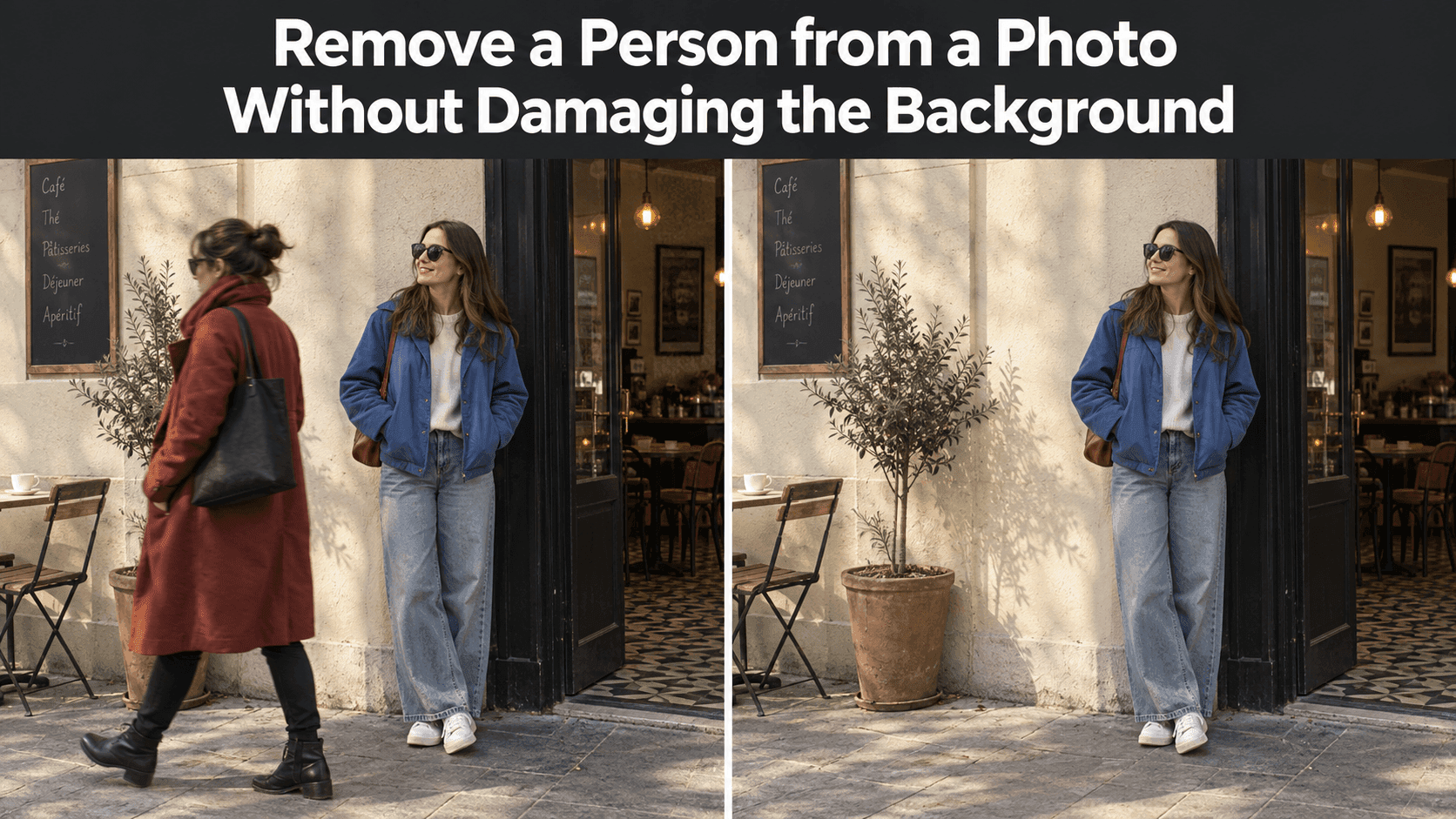
Remove a Person from a Photo Without Damaging the Background
Remove a Person from a Photo Without Damaging the Background
There is a stranger standing beside the café door in an otherwise lovely holiday photo. You can see your friend clearly, the afternoon light is good, and the little tiled entrance is exactly what you remember. You want to remove a person from a photo, not turn the café into another building.
That distinction matters. Erasing the figure is easy to describe. Rebuilding whatever they covered—the doorframe, floor tiles, a chair leg, perhaps a shadow—is the difficult part. A convincing edit keeps those details in the same place and leaves everyone else alone. Before writing a prompt, spend a minute looking at the space you are asking the editor to recover.
Before You Remove a Person from a Photo, Look Behind Them
Ask a simple question: if that person stepped aside, what would you expect to see?
Sometimes the answer is obvious. Someone standing in front of a plain painted wall covers a surface whose color and texture are visible on both sides. A person at the edge of a beach photo may cover only sand and a small stretch of water. These areas give an editor useful clues.
Other scenes are less forgiving. A passerby might hide half a shop sign, several patterned tiles, or the hand of someone you want to keep. No editing tool can retrieve details the camera never captured. It can make a plausible replacement, but plausible is not the same as accurate. If the sign contains a real name or the location matters, check another photograph of the scene rather than trusting newly generated lettering.
Look at the person’s outline as well as the space behind it. Hair against tree branches is harder to separate than a dark coat against a pale wall. Feet can interrupt paving lines and cast shadows across several surfaces. The bigger the area that must be rebuilt, the more carefully you will need to inspect the result.
This is why two photos with “one extra person” can require very different edits. Count the background features they cover, not just the number of people you want gone.
See Whether a Crop Would Do the Job
The least noticeable edit may be no removal at all. If a stranger appears close to the edge, try a modest crop first. You may be able to take them out while keeping the main subject, enough space around their head, and the parts of the setting that made you choose the photo.
Do not crop on autopilot. Cutting away too much of a doorway can make it look as though it ends abruptly. Moving your friend to the very edge may make the composition feel cramped. Save a copy of the original, test the crop at the size where you intend to post the image, and compare.
A crop is less useful when the unwanted person stands between two friends or directly in front of the landmark. That is where a targeted edit earns its place. Even then, consider whether every bystander needs to disappear. A few small figures in the distance can make a street look like a street. Removing the one person who blocks your subject is often enough.
Name the Person, the Place, and What Must Stay
“Remove the person in the background” sounds clear until there are four people in the photograph. A better request identifies the person by position or clothing, then protects nearby details.
For the café photo, you might write:
Remove the person in the red jacket standing beside the café door, behind my friend. Rebuild the visible doorframe, cream wall, and floor tiles so their lines continue naturally. Keep my friend’s face, hands, clothes, and position unchanged. Keep the original camera angle and afternoon lighting.
The prompt does not ask for a cleaner, brighter, or more fashionable café. Those requests would widen the edit and make it harder to tell whether the original scene has been preserved.
You can upload the source image and describe both the change and the details to preserve in Reveedo’s AI Image Editor. Its editing guidance makes that distinction explicit. Results still depend on the source photo and how much of the missing background can be inferred, so treat the first version as a draft to inspect, not an automatic final image.
If the unwanted person overlaps someone you want to keep, say so. “Keep the woman’s left sleeve and hand exactly as photographed” is more useful than a broad instruction to preserve the whole image. The sleeve edge is where a small mistake is most likely to show.
Watch the Lines That Give the Background Its Shape
Large, plain areas are not always the problem. People often notice an edit because a familiar line fails to meet itself.
In the café example, follow the vertical edge of the doorframe above and below the removed figure. Does it stay straight? Do the grout lines in the tiles continue at the same angle? Does the baseboard meet the wall, or has it dissolved into a vague patch? These are more useful checks than asking whether the edited corner looks “nice.”
Light needs the same attention. A person standing near a wall may cast a shadow onto it; remove the person and that shadow should usually go too. But do not ask the editor to erase every shadow in the frame. The chair, doorway, and your friend still belong to the same afternoon. Their shadows help hold the room together.
Reflections complicate things further. If the unwanted person appears in a window or polished surface as well as in the main scene, removing only the figure leaves a second version of them behind. Check glass doors, shop windows, mirrors, shiny cars, and even glossy floor tiles. Mention the reflection in a follow-up instruction if it remains visible.
A busy background is not automatically impossible to repair. Repeating bricks or floorboards can provide a pattern to follow. But repeating patterns also make small errors obvious: a brick that changes height or a floorboard that ends halfway across the image catches the eye quickly.
Make a Second Pass Only for a Specific Problem
After the first result, resist the urge to start over with a much longer prompt. Put the original and edited images side by side. Identify one defect.
Perhaps the person is gone, but the doorframe bends inward. Your next instruction can address only that: “Straighten the café doorframe to match its original position; do not change the rest of the image.” Perhaps the tiles look fine, but your friend’s fingers have changed. Ask to restore those fingers from the source photograph while keeping the repaired background.
Small corrections are easier to evaluate than another sweeping request. Keep each version so you can return to the strongest one. An edit that fixes a tile may introduce a new problem in the face; the latest version is not necessarily the best.
Check the picture twice: once as a small thumbnail and once at full size. At thumbnail size, look for an unnatural empty patch or a sudden change in light. At full size, inspect hair edges, hands, clothing seams, repeated patterns, and the area where the removed person met the ground. Switching between the original and the edit makes quiet changes easier to spot.
Know When the Photograph Is Asking for Too Much
Some removals have no convincing solution in a single image. If a person fills most of a narrow doorway, almost the entire doorway behind them must be invented. If they stand arm in arm with your friend, rebuilding the hidden shoulder and hand involves changing your friend too. A simple request may not keep all of that faithful.
Try another photo from the same moment if you have one. A second angle can show the missing background, or it may simply be a better picture. You can also leave the bystander in place. An honest, slightly busy photograph is preferable to a spotless one with distorted people or made-up signs.
The intended use matters. Removing a passerby from a personal holiday picture is different from altering a news image, documentary photograph, or record of an event. Where the scene is being presented as evidence, changing who was there can mislead viewers even if the edit is technically seamless.
For an ordinary social post, the goal is more modest. To remove a person from a photo successfully, keep your attention on the place they occupied. The edit works when the floor, light, architecture, and people you wanted to photograph still look like they belonged together before anyone touched the image.