



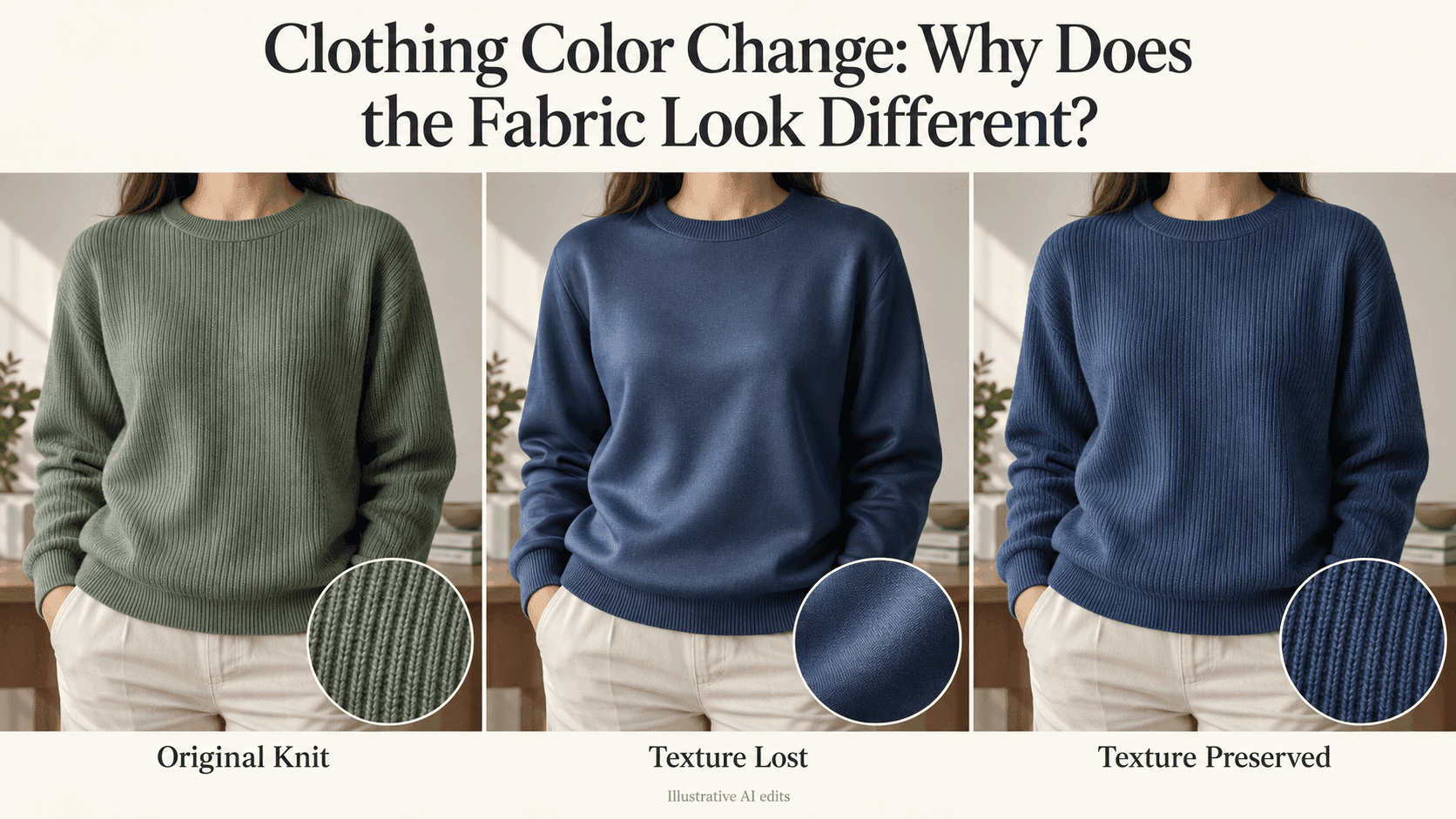
Clothing Color Change: Why Does the Fabric Look Different?
Clothing Color Change: Why Does the Fabric Look Different?
The green sweater is now blue. That part worked. But the knitted lines across the chest have disappeared, and the sleeves look smoother than they did before.
It is easy to miss this at first. When you ask for a clothing color change, you tend to look at the color. Only afterward do you notice that the shirt looks thinner, the denim looks newer, or the cotton has picked up a shine it never had.
Before generating another version, put the original beside the result. Find one small area where the difference is obvious. That will give you something more useful to work with than “the fabric looks wrong.”
Why a clothing color change can affect more than color
A generative edit is not necessarily the same as adjusting the color of existing pixels. Parts of the garment may be recreated along with the new shade.
The overall shape can stay convincing while smaller details change. A collar remains a collar, but the weave beneath it becomes softer. A sleeve keeps its outline, yet the fine ribs running along it vanish.
Sometimes the original photo also gives the editor very little to work with. A dark, blurry patch may suggest fabric without showing its actual structure. Any crisp texture that appears there afterward could be newly generated rather than recovered.
There is another possibility worth checking: the texture has not disappeared. The new color simply makes it less noticeable. Compare both images at the same size and look for the position of the detail, not just how strongly it stands out.
“Make it more realistic” doesn’t say what needs fixing
Look at the area you picked. What changed?
If a cotton shirt now has broad, bright reflections, the problem is shine. If a sweater has become smooth, the problem is the missing knit pattern. If a flower print has changed shape, adding more texture will not put the flowers back.
Describe the visible difference as plainly as you can.
You also don’t need to identify the exact fiber. A photograph may not tell you whether a sweater is wool, cotton, or a blend. “Keep the narrow vertical ribs” is a clearer instruction than an uncertain material label.
The same goes for words such as “premium,” “luxurious,” and “polished.” They sound positive, but they introduce a styling request. If you only want another color, leave them out.
Start again from the original garment
For this kind of edit, return to the original photo rather than a version that has already lost its texture.
In Reveedo’s AI Image Editor, you can upload the source and describe both the change and the details to preserve. Make it clear that you are recoloring the garment already in the picture, not replacing it.
For a ribbed sweater:
Recolor the existing green sweater navy blue. Keep the narrow vertical ribs, their spacing, and the way they follow the folds. Preserve the cuffs, neckline, fit, and sleeve length. Do not smooth the knit or change the person, background, or lighting.
For a matte shirt:
Change the existing shirt to burgundy. Keep its original matte surface, visible fine texture, seams, and fold positions. Do not add shine, sharpen the fabric excessively, or redesign the shirt.
Choose the description that fits the source. A satin blouse should not be made matte just because a matte finish worked for another image.
These instructions narrow the request. You still need to inspect the result; they do not lock every stitch or facial detail in place.
Check each fabric where its character shows
A full-size view can hide small changes. Zoom in, but choose an area that actually tells you something.
For knitwear, follow one rib. Start near the neckline and trace it toward a fold. It should bend with the garment rather than disappear into a blank patch or restart in a different direction.
For denim, look near seams and pockets. Faded edges and uneven color may be part of the jeans’ appearance. If everything becomes a clean, uniform blue, the edit may have removed the worn finish along with the old shade.
For satin, compare the highlights. Shine belongs on this fabric. The question is whether it follows the original folds and light, not whether you can eliminate it.
For printed clothing, watch the design. Check a letter, a flower, or the corner of a check pattern. If its shape changes, you are no longer looking at just a color adjustment.
One good detail check can be more revealing than repeatedly judging whether the whole picture looks attractive.
Try a closer shade if the result keeps drifting
Suppose a pale sweater keeps losing its knit pattern when you make it dark navy. Try a medium blue from the same original photo.
This is a test, not a suggestion to recolor the image in several stages.
If the medium-blue version keeps the texture and the navy version does not, you have a clearer comparison. You can then focus the next request on preserving the visible knit through the darker color.
If both versions lose the same detail, look again at the source. Is that area in focus? Is it large enough to see? Is the texture visible at all?
At that point, another source photo may be more useful than another paragraph of instructions.
Know when a different editing method makes sense
Generative editing is useful for exploring a look, but it is not the only way to recolor clothing.
If the garment’s existing details must remain very close to the source, a conventional editor with a carefully isolated clothing selection and color adjustments may be more suitable. You still need to check edges and shading, especially with large changes in brightness.
For product photos, compare the final image with the actual item. A convincing blue sweater does not prove that a real blue version has that exact texture, opacity, or construction.
Before saving, put the original and the edit side by side once more. Ignore the new color for a moment. Does it still look like the same piece of clothing?
That is the check that matters. A better-looking fabric is not necessarily a better edit.