



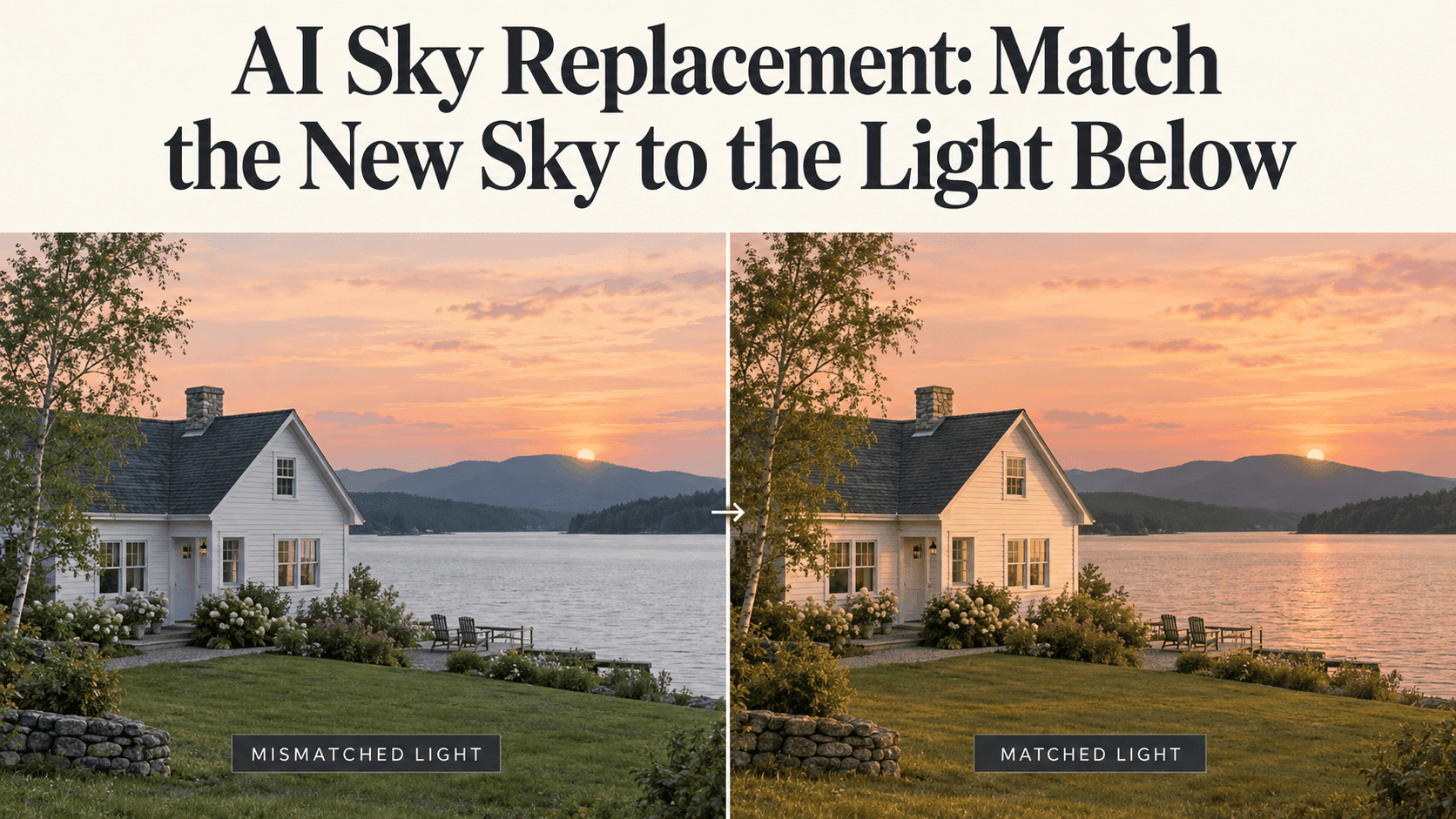
AI Sky Replacement: Match the New Sky to the Light Below
AI Sky Replacement: Match the New Sky to the Light Below
You wanted to improve the sky, not change the house. But after adding a sunset, the white walls look strangely cold, the driveway is still brightly lit, and the whole picture feels assembled rather than photographed.
The tempting fix is to warm everything up. Sometimes that helps. Sometimes it just gives you an orange driveway.
With AI Sky Replacement, the more useful decision often comes earlier: choose a sky that belongs with the light already in the picture. You can make a bigger change, but then you are taking on more than the clouds.
Before AI Sky Replacement, cover the sky with your hand
Look only at the lower half of the photograph. What sort of day does it suggest?
A house with evenly lit walls and soft shadows could sit comfortably beneath pale cloud cover. A tree casting a crisp shadow across a path suggests more direct light. You do not need to calculate the sun’s position precisely to notice a serious mismatch.
Use those observations to narrow your AI Sky Replacement options. If the foreground looks like bright daytime, start with another daytime sky rather than a dark evening scene.
That may sound less exciting, but it gives the edit somewhere sensible to begin.
For a first AI Sky Replacement, improving a blank sky with gentle cloud detail can be enough. The photograph does not need a new time of day to become more useful.
Try the quieter sky before the spectacular one
Imagine the house has a pale grey sky and almost no strong shadows. Here is an AI Sky Replacement prompt you could test:
Replace the blank sky with soft grey clouds and a little natural variation. Keep the existing diffuse daylight. Preserve the house, windows, roof, garden, and ground. Keep the horizon unchanged and do not add a visible sun.
You are not asking the editor to make the entire property look like a different place. You are giving the empty area something to do.
When reviewing this AI Sky Replacement, compare the windows and roofline with the original. A nicer sky is not worth an extra window or a changed chimney.
You can test a focused edit in Reveedo’s image editor, using your photo and a written request. Preservation depends on the result; the prompt is not a lock.
Keep one restrained AI Sky Replacement before trying anything more dramatic. It gives you a useful comparison later. Compare versions from the same original file so earlier edits do not quietly become part of your next sky test.
A warm horizon does not fix the wrong shadows
Now suppose you want evening light. Look at the existing shadows again. Does the proposed bright area in the sky make sense with the illuminated sides of the house?
An AI Sky Replacement with a visible sun can make a contradiction obvious. If the lighting direction does not fit, choose another sky instead of trying to hide the problem with a color filter.
Where the source already has warm, low light, try a more modest request:
Use a pale evening sky with restrained warm color, consistent with the existing light direction. Keep the building geometry and shadow placement. Avoid an orange cast across the entire foreground.
AI Sky Replacement does not require every surface to match the clouds. White paint, foliage, and asphalt should still look like different materials.
If your AI Sky Replacement only works after a substantial foreground relight, treat that as a broader creative edit, not a simple swap.
Look for the old sky in the water
A pond can keep the original sky visible long after you have replaced the one above it.
After AI Sky Replacement, look at any water or glass that clearly reflects the sky. Does a recognizable old cloud pattern remain? Is a bright reflected area inconsistent with the new scene?
Do not solve this by making every reflective surface pink. Ripples, viewing angle, and reflections of nearby objects affect what belongs there.
For an AI Sky Replacement beside water, specify that sky reflections should change while the shoreline and water texture stay intact.
Then check whether the editor actually did that. New ripples are one thing; a moved bank or an invented boat is another.
Finish your AI Sky Replacement at the edges, then step back
Rooflines and fine branches deserve a closer look. AI Sky Replacement can leave a pale fringe or miss small openings between leaves.
If your editor supports local cleanup, fix the affected area. Otherwise, a lower-contrast sky may be easier to blend. Do not blur the whole photograph to hide one troublesome branch.
View your AI Sky Replacement at normal publishing size afterward. Does your eye still go to the house, or has the sky become the subject?
Keep the original, particularly for photographs presented as records of a location or event, and disclose substantial alterations where relevant.
The best AI Sky Replacement is not necessarily the version with the richest sunset. It is the version you can look at without immediately wondering what happened to the light.