



AI Product Video: Camera Orbit or Product Rotation?
AI Product Video: Camera Orbit or Product Rotation—which Should You Prompt?
You have a good photograph of a skincare bottle. The label is clear, the lighting works, and the background doesn’t need changing. All you want is a little movement.
So you type “rotate around the product.”
The result might be a camera moving around the bottle. It might be the bottle spinning in place. Sometimes both happen, and the countertop seems to move with them.
Before adding more detail to an AI Product Video prompt, settle that first question: who is moving?
The answer affects more than the motion. It changes what happens to the background, which parts of the packaging become visible, and how much information the model has to invent beyond the original photograph.
AI Product Video: Move the Camera or Move the Object?
Imagine the bottle sitting on a shelf beside a small plant.
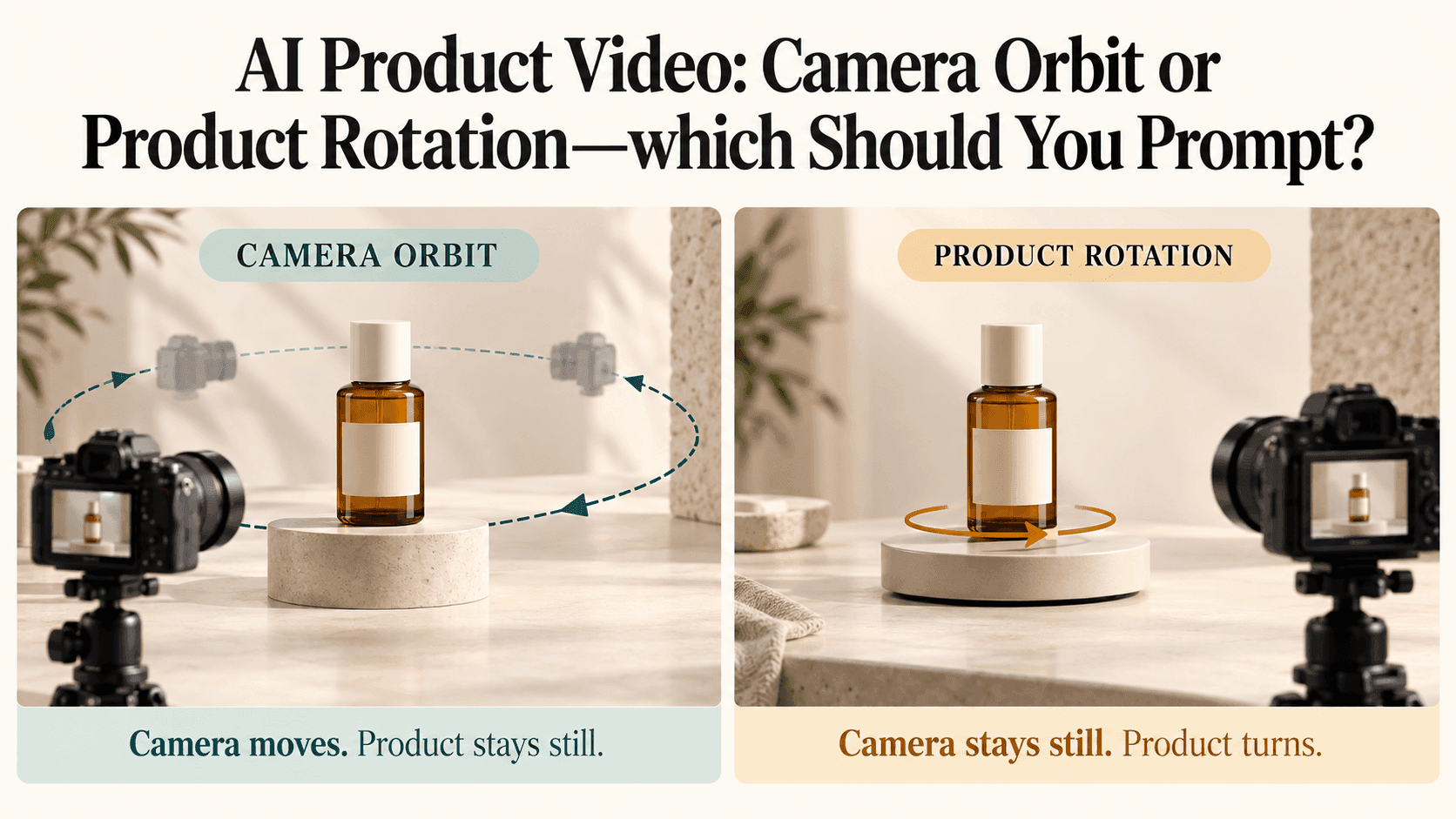
If you walk around it with a camera, the bottle stays on the shelf. You see more of one side, and the plant shifts position relative to it as your viewpoint changes. That’s a camera orbit.
Now leave the camera where it is and turn the bottle on the shelf. The plant stays in the same place in the picture. Only the bottle changes its orientation. That’s product rotation.
On a plain studio background, the distinction can be subtle. In an AI Product Video with furniture, props, or a recognizable setting, it matters much more.
A useful starting sentence is simply:
The bottle stays still while the camera moves.
Or:
The camera stays still while the bottle turns.
Neither is a finished prompt, but both remove the ambiguity in “rotate around the product.”
A Small Orbit Can Be Enough
For a bottle beside a window, the setting may be part of what makes the image work. There’s light across the countertop, a little space behind the product, perhaps a shadow that gives the scene depth.
A short camera arc lets you explore that space without making the product appear to spin by itself.
For this kind of AI Product Video, try:
The bottle remains stationary on the countertop. The camera moves through a short, smooth arc, beginning in front of the bottle and ending at a slight side angle. Maintain a similar distance and height, with the bottle centered throughout.
This is an example to adapt, not a tested result.
Notice that it doesn’t ask for a complete orbit. If a slight angle reveals the bottle’s thickness and catches the light nicely, the shot may already have everything it needs.
A larger orbit also exposes more of the setting. The model may need to generate parts of the room that aren’t visible in the original image. That doesn’t mean the shot will fail, but it gives you more to check.
When reviewing the AI Product Video, watch the shelf and plant as well as the bottle. Their apparent positions should change in a way that makes sense for the moving viewpoint. The shelf shouldn’t quietly acquire a different shape halfway through.
Product Rotation Suits a Simpler Setup
If the background is only there to keep attention on the item, a turntable-style shot may be the better fit.
Think of a speaker against a plain wall or a skincare bottle on a clean studio surface. The purpose is to show the object’s shape, not take the viewer around a room.
An AI Product Video prompt could read:
The camera remains fixed. The bottle rotates in place around its vertical axis, as though on a turntable. Start with the front label facing the camera, turn to a three-quarter view, then pause. Keep the bottle upright and centered at a consistent size.
The end position helps explain what you want. “Clockwise” can still be useful, but it depends on the viewing direction. A front view turning into a three-quarter view describes a result you can recognize.
Check whether the bottle actually rotates in place. Sometimes a generated object drifts sideways, grows slightly, or tilts while turning. Those changes are separate from the rotation you requested.
For your first AI Product Video test, keep the camera fixed throughout. Combining an orbit and a product turn can be a deliberate creative choice, but it makes a basic motion problem harder to diagnose.
What Happens to the Label?
The front label won’t keep facing you through a full turn.
That’s worth saying because it’s easy to write two instructions that sound helpful but conflict: “rotate the bottle 360 degrees” and “keep the front label fully visible.”
As the bottle turns, its front turns away. As the camera travels around a stationary bottle, the camera eventually looks at another side. Either way, the relative viewing angle changes.
If the brand name is the point of your AI Product Video, limit the angle or include a separate front-facing shot. You can also ask the movement to finish at the front, leaving a brief moment for the viewer to read the packaging.
Don’t judge success only by whether the words remain legible. Check that the label stays attached to the same part of the bottle. A label sliding around the surface to face the viewer is not accurate product preservation.
On reflective packaging, look at the material too. Highlights can move as the camera or object changes position. But a glass bottle shouldn’t gradually become metallic just because the reflections are changing.
A Full Turn Raises a Different Problem
Your front photograph may say nothing about the back of the product.
The model can generate a plausible rear surface, but plausibility is not the same as accuracy. A hidden seam, charging port, handle, or back label may be wrong even when the motion looks convincing.
For an AI Product Video that needs to show those details, use relevant reference photographs where the selected model supports them. Compare the output against the actual product rather than assuming that additional references guarantee a correct reconstruction.
If the clip is meant to document the exact shape and features from every angle, real turntable footage or a verified 3D model may be a more suitable route.
You don’t have to turn a front-view marketing image into a complete product inspection.
Try the Two Moves as Separate Tests
Reveedo’s image-to-video page supports prompts describing camera and subject movement, with reference options depending on the selected model.
Use the same starting image for both versions of your AI Product Video. Keep the available settings consistent. In one prompt, hold the product still and ask for a small camera arc. In the other, hold the camera still and ask for a limited product turn.
Then compare what each shot gives you.
Does the orbit make the setting feel more believable? Does the rotation show the product’s shape more clearly? Does either version introduce changes to the packaging that make it unusable?
Choose the AI Product Video that answers the viewer’s question. If they need to understand the bottle’s thickness, a short turn may do it. If they need to picture it on a bathroom shelf, the camera arc may be more useful.
The shot doesn’t become better simply because something completes a circle.