



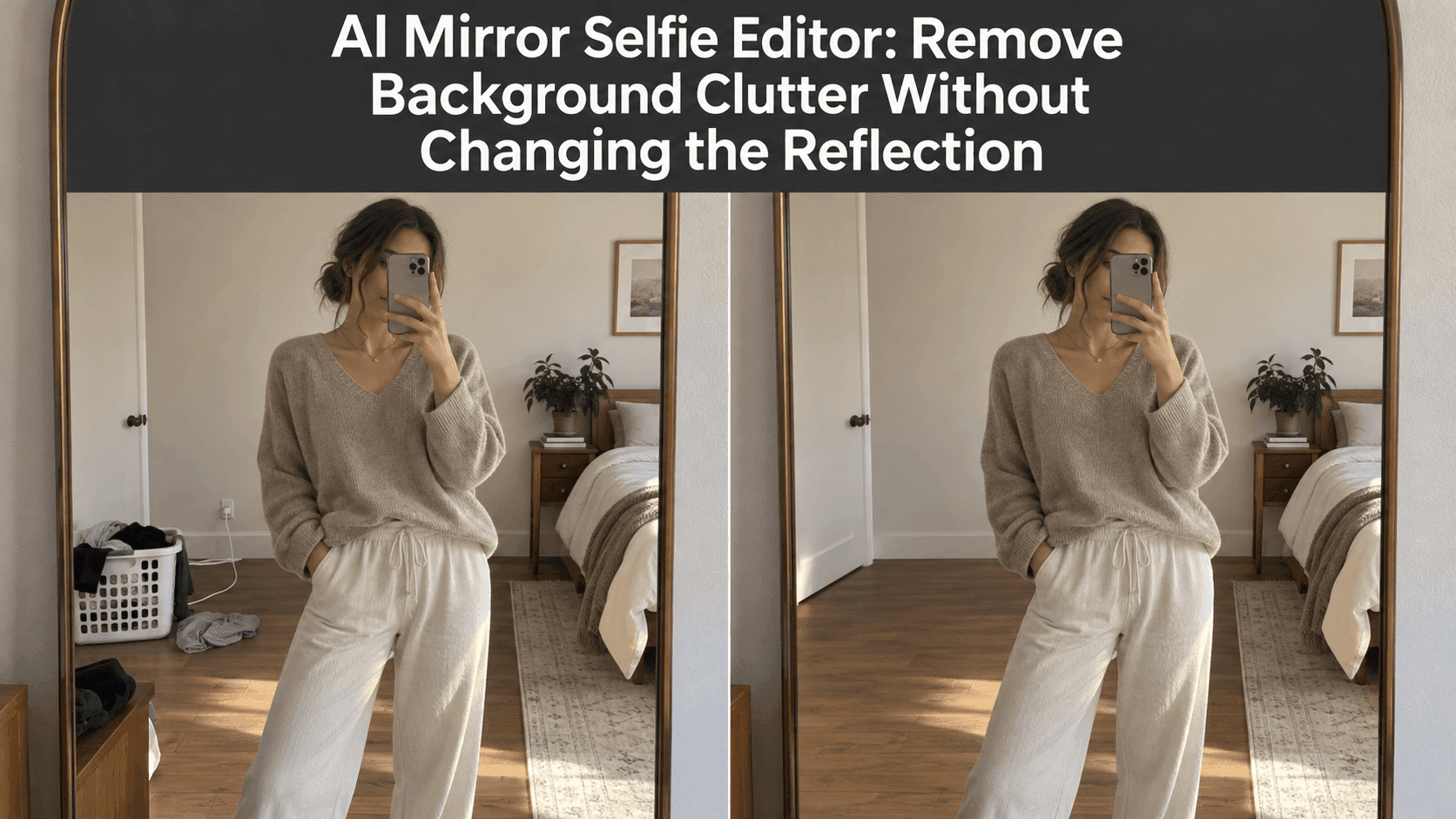
AI Mirror Selfie Editor: Remove Background Clutter Without Changing the Reflection
AI Mirror Selfie Editor: Remove Background Clutter Without Changing the Reflection
The outfit looks right. The light is decent. Then you notice the laundry basket beside your feet, a charging cable across the floor, and the open closet behind your shoulder. That is the frustrating thing about a mirror selfie: the mirror records the room along with you.
A mirror selfie editor can clear those distractions, but the useful edit is usually smaller than you think. You want the basket gone—not a different bedroom, a narrower waist, or a phone that has somehow switched hands. The aim is to leave the photograph feeling like the one you took, only with less competing for attention.
Start with the mirror selfie editor’s most important rule
Before removing anything, decide what must stay exactly as it is. In most mirror photos, that means your face, hair, body shape, pose, clothing, phone, and the mirror frame. It also means keeping the direction of the reflection intact.
That last point is easy to miss. A mirror selfie editor may produce a tidy-looking image at first glance while quietly shifting a shoulder, changing a sleeve, or rebuilding the phone case. These are not background changes. They make the photograph less trustworthy, even when the new room looks polished.
Write down the parts you want protected before you edit. A short instruction works better than a vague request to “clean up the photo”:
Remove the laundry basket reflected on the floor to the left of my legs. Continue the existing floor and wall naturally. Keep my face, hair, pose, outfit, hands, phone, mirror frame, and lighting unchanged.
The instruction names one object, gives its location, and says what should fill the space. More importantly, it sets a boundary around the person.
Look at what the mirror actually contains
A mirror photo can show two versions of the room at once. The main scene appears inside the reflection. A narrow strip outside the mirror may show the real wall, a dresser, or the edge of a door. If the same object appears in both areas, removing it from only one side creates a strange mismatch.
Take a moment to trace the edges of the object you want gone. Is the laundry basket entirely inside the mirror? Does the cable run across the reflected floor and continue outside the frame? Does a coat overlap your arm, or is there clear wall between you and it?
The easiest clutter to remove sits against a simple, visible surface. A small bag in front of a plain wall is usually a cleaner job than a chair hidden partly behind your legs. When an object covers your sleeve or the mirror’s edge, the editor has to invent pixels that were never photographed. That is where odd seams and altered body outlines tend to appear.
You do not have to erase every sign that someone lives in the room. A doorframe or the corner of a shelf can help the reflection make sense. Removing every object often leaves a blank backdrop that looks less natural than the original.
Make one change before asking for another
It is tempting to request a clean floor, closed closet, brighter window, smoother shirt, and warmer skin tone all at once. If the result looks wrong, you will have no clear idea which instruction caused the problem.
Start with the distraction that pulls your eye first. For one mirror selfie, it might be a bright shopping bag near your shoes. For another, it is the pile of clothes behind your head. Remove that single item, compare the result with the original, and only then decide whether the next item matters.
You can make this kind of targeted request in Reveedo’s AI Image Editor. Keep your wording tied to the photograph in front of you. “Remove the blue bag on the reflected floor beside the dresser” gives the editor a clearer job than “make my room look aesthetic.”
After the first pass, check the surfaces that were uncovered. Floorboards should continue in the same direction. A baseboard should not stop and restart. If a wall has a soft shadow, the repaired patch should not look freshly painted and flat. These details are small, but they are often what makes an edit noticeable.
Keep the light—and the imperfect details that belong to it
Suppose daylight enters from a window on the right. The side of your face, the floor, and the clutter may all carry clues about that light. Remove the clutter, and the replacement area still needs to belong to the same room at the same moment.
Ask the mirror selfie editor to preserve the existing light rather than “improve” it. A brighter replacement wall can make your outline look pasted on. A spotless floor with no contact shadow beneath your shoes can be just as distracting as the cable you removed.
The same restraint applies to the mirror itself. A faint smudge or ordinary reflection is not always a flaw worth fixing. If you ask an editor to remove every mark, it may soften the mirror frame, blur hair edges, or smooth texture out of your clothes. Clean the distraction you came to fix; leave the rest alone unless it genuinely needs work.
Phone placement deserves its own check. In many mirror photos, the phone covers part of the face. The uncovered part is all the photograph knows. An edit that invents a hidden eye or moves the phone away may look clever, but it is no longer a faithful cleanup of the original image.
Pay attention where objects meet your outline
Background cleanup becomes harder at the edge of a person. Loose hair, a raised elbow, the gap between an arm and the torso, and fingers wrapped around a phone all leave narrow spaces for an editor to misread.
If clutter touches one of those edges, use a tighter instruction. Describe the area to remove and explicitly protect the nearby detail:
Remove the coat hanging behind my right elbow. Rebuild the plain wall visible around it. Do not change the shape of my arm, the sleeve edge, or the gap between my arm and my body.
Sometimes there is not enough visible information for a convincing repair. A large chair behind half your body is different from a small bag on an open patch of floor. If repeated edits keep changing your silhouette, try another photograph or leave that object in place. A believable room with one extra chair is better than a “clean” room that changes your body.
This is also why cropping can help. If the unwanted item sits at the very edge of the image, a modest crop may solve the problem without asking a mirror selfie editor to reconstruct the room at all. Keep enough of the mirror and floor for the photo to retain its original balance.
Check the result at two sizes
First, view the edited image small, as someone would see it in a feed or message. Does your eye go to the outfit or expression rather than the repaired wall? Does the room still feel plausible?
Then zoom in. Look at the mirror border, hairline, fingertips, phone case, clothing seams, floor pattern, and the area where the removed object used to be. Switch back and forth with the original. It is surprisingly easy to miss a changed necklace or an altered shoe when you are focused on an empty corner.
A mirror selfie editor has done its job when the edit does not become the story. The room need not look staged for a property listing. It only needs to stop interrupting the photograph.
Before sharing, give the reflection one final look for things that are easy to overlook: an address on a package, a work badge, a laptop screen, or someone else in the background. Those details matter more than a perfectly clean floor. Keep the image recognizably yours, remove only what is in the way, and let the ordinary light of the original photo do the rest.