



Why Does My AI Hairstyle Look Like a Wig?
Why Does My AI Hairstyle Look Like a Wig?
The length is right. The color is right. Somehow, the hair still looks as though it was placed on top of the photograph.
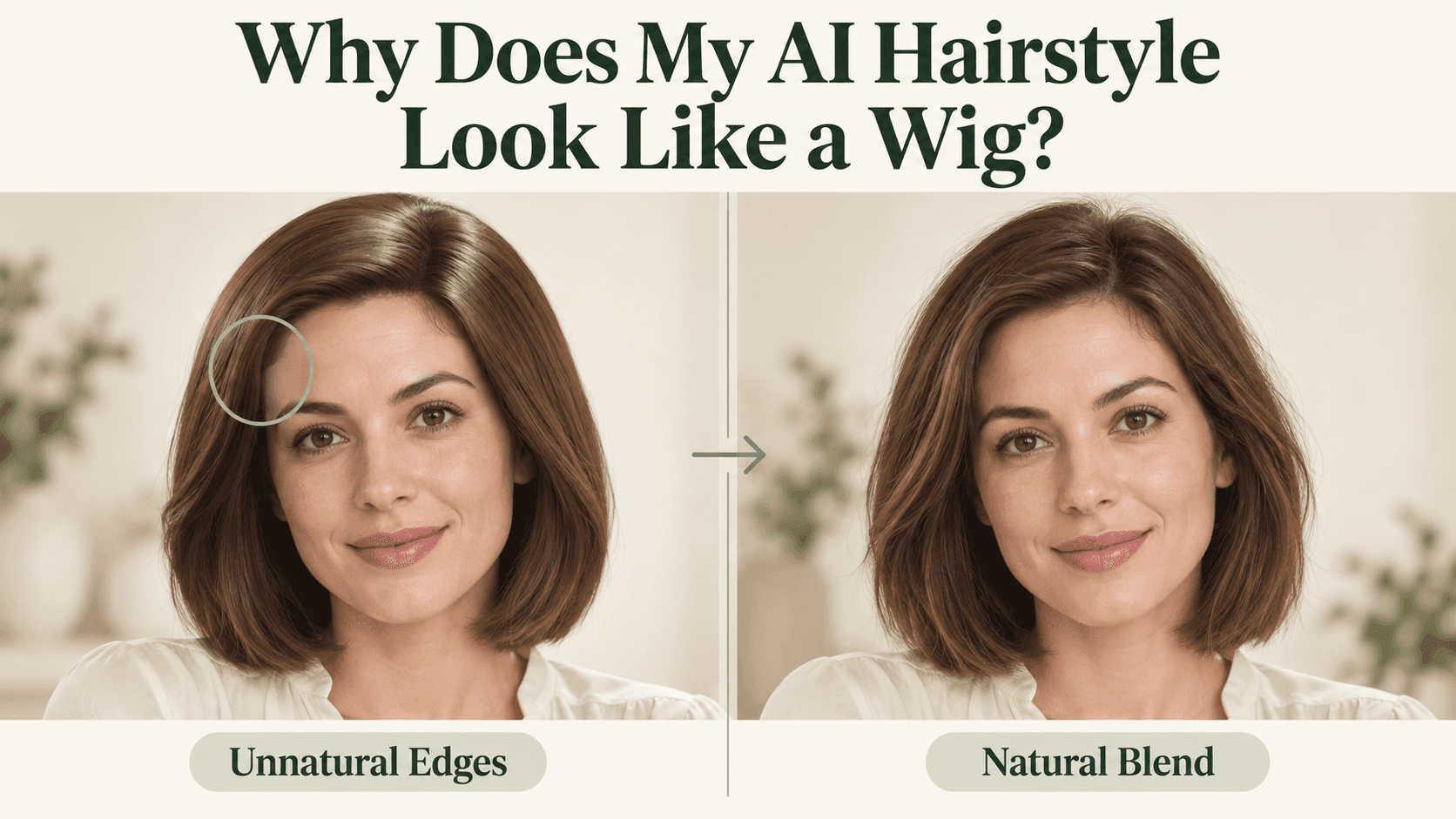
When an AI Hairstyle feels disconnected from the person wearing it, look at the joins: the forehead, the parting, the ears, and the shoulders. A mismatch there can be more distracting than an imperfect strand somewhere else. The haircut itself may not be the problem.
Start where the hair meets the forehead
An unbroken line across the forehead deserves a closer look. So does a hairline that has moved lower than the one in your original photo.
Compare your AI Hairstyle with the source image. You are not looking for a neat outline. You are checking whether the transition from skin to hair still belongs to you.
If you use a prompt-based editor, try a narrow correction:
Keep the current haircut. Match the visible hairline and temple shape to the original photo. Soften the solid edge where the hair meets the forehead. Leave the face and hair color unchanged.
Do not ask the AI Hairstyle editor to scatter baby hairs everywhere. Extra strands can become another distraction. And if a fringe hides your actual hairline in the source, a different photograph may help more than another instruction.
Is your AI Hairstyle sitting too high?
Look at the space above the forehead and beside the ears. Has a close-fitting bob become a rounded shape? Is there a thick section of hair where the original had very little?
Some styles are deliberately full. The question is whether that fullness is part of the look you chose or something added during generation.
For an AI Hairstyle with too much volume, point to the area:
Keep the length and parting. Reduce the rounded volume at the crown and the width beside the ears. Keep the visible amount of hair close to the original.
Avoid flattening the whole AI Hairstyle if only the crown bothers you. You may like the waves at the ends.
A photograph cannot measure your hair density. Use the original as a visual reference, not proof that a particular amount of volume is physically achievable.
The shine may belong to a different photograph
Imagine a softly lit indoor portrait with a bright white highlight running across the entire fringe. The hair might be detailed, yet still seem separate from the face.
Inspect the light in your AI Hairstyle preview. If the left cheek is brighter, does the hair generally fit that lighting? Does one side suddenly have a studio spotlight the rest of the picture lacks?
Hair and skin do not reflect light identically. You do not need matching brightness everywhere. You are looking for an unexplained lighting change.
A correction for this AI Hairstyle problem could be:
Match the hair lighting to the original portrait. Reduce the broad glossy highlight while retaining strand detail. Do not relight the face or background.
Do not remove all shine. That can leave the hair looking like a solid matte shape instead.
Check what happens around ears, glasses, and clothing
A strand can cover part of an ear naturally. It should not appear to pass through a glasses arm or merge into the collar.
These overlaps are worth inspecting before rejecting an AI Hairstyle. Sometimes the cut looks strange because one edge is wrong, not because the style does not suit you.
Look at the ends where they meet the shoulders. Are they separated from the shirt? Is there a pale border that was not present in the original?
If the source is blurry in that area, choose a clearer photo. Asking an AI Hairstyle tool for more detail cannot reliably recover what the camera never captured.
Fix one thing, then compare again
On Reveedo, the hairstyle tool offers preset looks. If one preview feels too bulky, try a closer option using the same portrait.
For written corrections, use Reveedo’s AI Image Editor. Its prompt-based workflow lets you describe a change and specify what to preserve; it is separate from selecting a hairstyle preset.
Do not give the AI Hairstyle five new jobs at once. Start with the most noticeable problem: the hairline, crown, shine, or an overlap.
Save the original, the first AI Hairstyle result, and the revised AI Hairstyle version. View them at the same size. Has the problem improved without changing your eyes, jaw, or expression?
If your face starts drifting, return to the original rather than repeatedly editing the altered portrait.
An AI Hairstyle preview does not have to show every strand perfectly to help you choose a haircut. But the hair should look attached to your head, lit by the same room, and separate from your clothing.
Once those details feel coherent, it is much easier to judge the AI Hairstyle for what you wanted to see in the first place: the cut.