



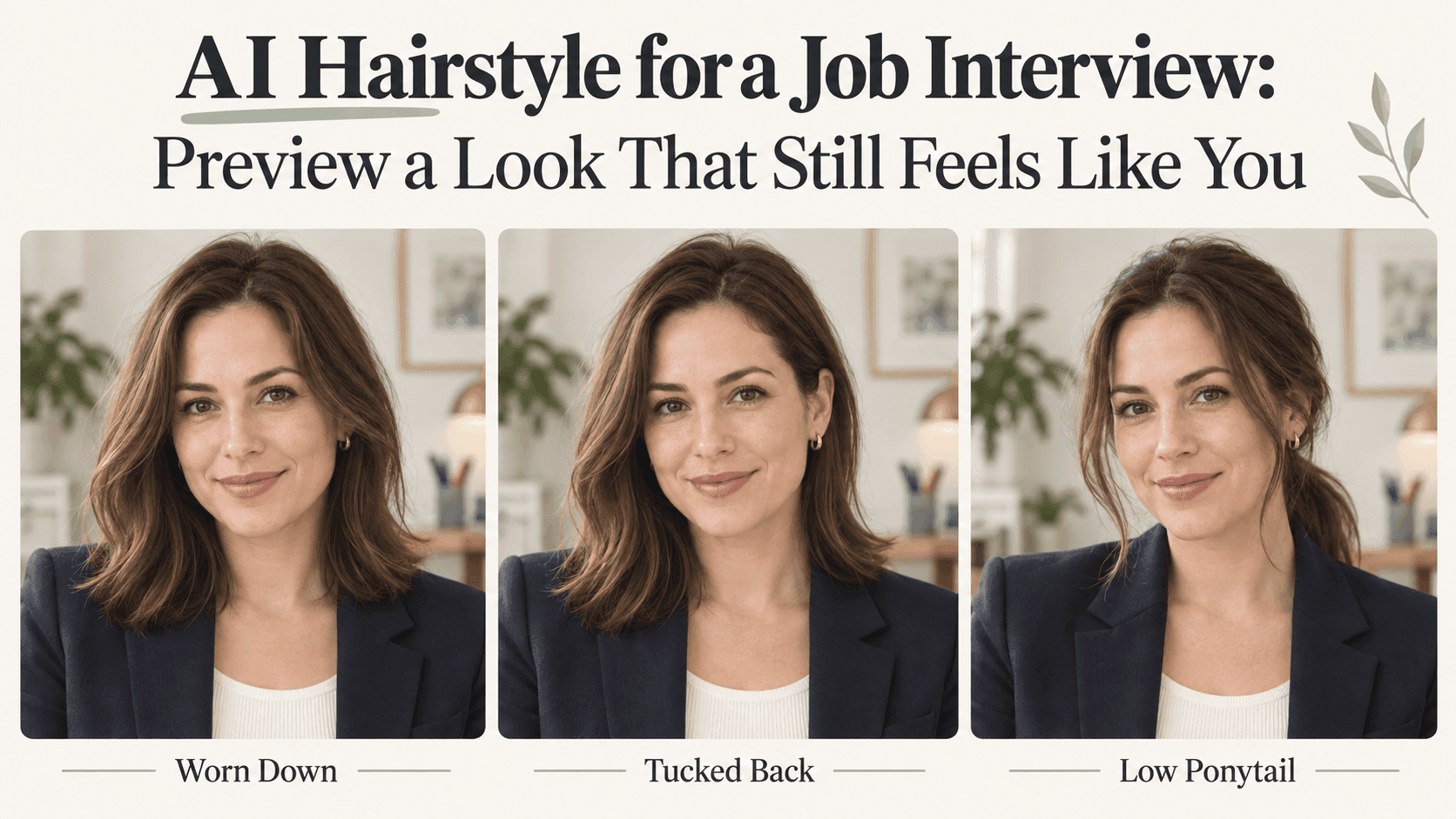
AI Hairstyle for a Job Interview: Preview a Look That Still Feels Like You
AI Hairstyle for a Job Interview: Preview a Look That Still Feels Like You
You’ve picked a shirt for the interview. Then you put it on and notice your hair sitting awkwardly over the collar. Would it look better tucked back? Tied up? A little shorter?
An AI Hairstyle preview gives you somewhere to try those ideas without making a last-minute appointment. You don’t need a completely different look. Sometimes you just want to see whether the hairstyle you already wear works with the rest of your outfit.
That’s a useful place to start. “Does this feel right on me?” is a question a preview can help with. “Will this make someone hire me?” isn’t.
Take the photo in your interview outfit
A hairstyle can look quite different above a high collar, an open-neck shirt, or a plain T-shirt. If you’ve already chosen your clothes, wear them in the photo. There’s little point comparing styles against a neckline you won’t have on the day.
Keep your glasses on, too. Hair tucked behind an ear has to sit around the frame, and a fringe that looks good without glasses may fall somewhere you find annoying when you put them back on.
You don’t need studio lighting. A clear photo in ordinary, even light is enough. Leave room around the top and sides of your head, and skip the beauty filter. You’ll want to compare the result with your actual face, not an already edited version.
For a video interview, take the photo near your usual computer setup. It won’t reproduce the whole call, but it gives you a more relevant starting point than a holiday selfie.
Use an AI Hairstyle preview to settle one question
Before generating anything, decide what you’re unsure about.
If you usually wear long hair down, the question might be whether to leave it loose or gather it into a low ponytail. If you have shorter hair, you might only want to compare your usual parting with a side-swept version.
Try those options first. You can always explore a bigger change later.
This also makes the results easier to judge. When one picture changes the haircut, color, volume, makeup, and clothing, you may like it without knowing why. Keep most things familiar and the decision becomes much simpler.
There isn’t one haircut that makes everyone look ready for an interview. You don’t need to straighten curls or hide your usual style. The aim is to find something you’re comfortable wearing, not to make yourself look like a stock photo of an office worker.
Ask for the change you actually want
“Make my hair look professional” sounds clear until you try to picture exactly what it means.
Do you want the fringe out of your eyes? Less volume at the sides? A loose ponytail rather than a tight one? Those are instructions you can describe.
For written edits, you can upload your photo to Reveedo’s AI Image Editor and separate the change from the details you want preserved.
If you want to keep your hair down:
Keep my current haircut, color, and texture. Tuck the hair on one side behind my ear, leaving a few natural loose strands. Do not change my face, glasses, clothes, lighting, or background.
If you want to compare a tied style:
Show my existing hair gathered into a loose low ponytail. Keep my natural hairline and hair texture. Do not add thickness, smooth my skin, or change my facial features.
For short hair:
Keep the same haircut and length. Sweep the front slightly to the side without adding height or a wet-look finish. Leave my face, ears, glasses, and outfit unchanged.
You’re asking for a small edit, so the instructions can stay small. There’s no need to add “confident,” “successful,” or “executive.” None of those words explains where you want the hair to sit.
Don’t let a nicer picture make the decision for you
Put the original and the AI Hairstyle result next to each other.
First, check whether the tool changed anything besides the hair. A narrower jaw, brighter eyes, or a new shirt can make the whole picture more appealing while telling you very little about the hairstyle.
Then look at the parts you were trying to compare. Does the fringe still fall over your glasses? Do the ends catch on the collar? Is the ponytail made from a believable amount of hair?
Look closely around the ears and frames. If hair passes through the glasses or an ear has disappeared, set that version aside. It isn’t a reliable picture to judge from.
You don’t have to inspect every strand. You’re looking for a useful preview, not preparing the image for a magazine cover.
Try the favorite with your real hair
Suppose you prefer the low ponytail. Before calling the decision finished, tie your hair that way and leave it for a while.
Shorter pieces may fall out. A clip may feel uncomfortable against your chair. Your headset may push the sides flat. None of that is visible in a generated still.
For an online interview, record a short answer to a practice question. Watch it at the size you’d normally see a video call. You’ll learn more about hair falling forward while you speak than you would from another round of image generation.
If a style needs constant adjustment, simplify it. That doesn’t mean the preview was useless; it helped you find out what wasn’t worth the trouble.
You may not need a haircut at all
The best result might be your usual hair with a slightly different parting. Or the same style you started with.
That’s a perfectly useful outcome. An AI Hairstyle tool doesn’t have to lead to a transformation.
If you do want a substantial cut, take the preview to your hairdresser and ask what it would require with your current hair. The picture can show a direction, but it can’t tell you how that cut will dry, how much styling it needs, or whether the length is practical for you.
Once you’ve found a look you can comfortably manage, stop comparing. Try it with the outfit, check it on camera if needed, and leave yourself time to think about what you want to say in the interview.