



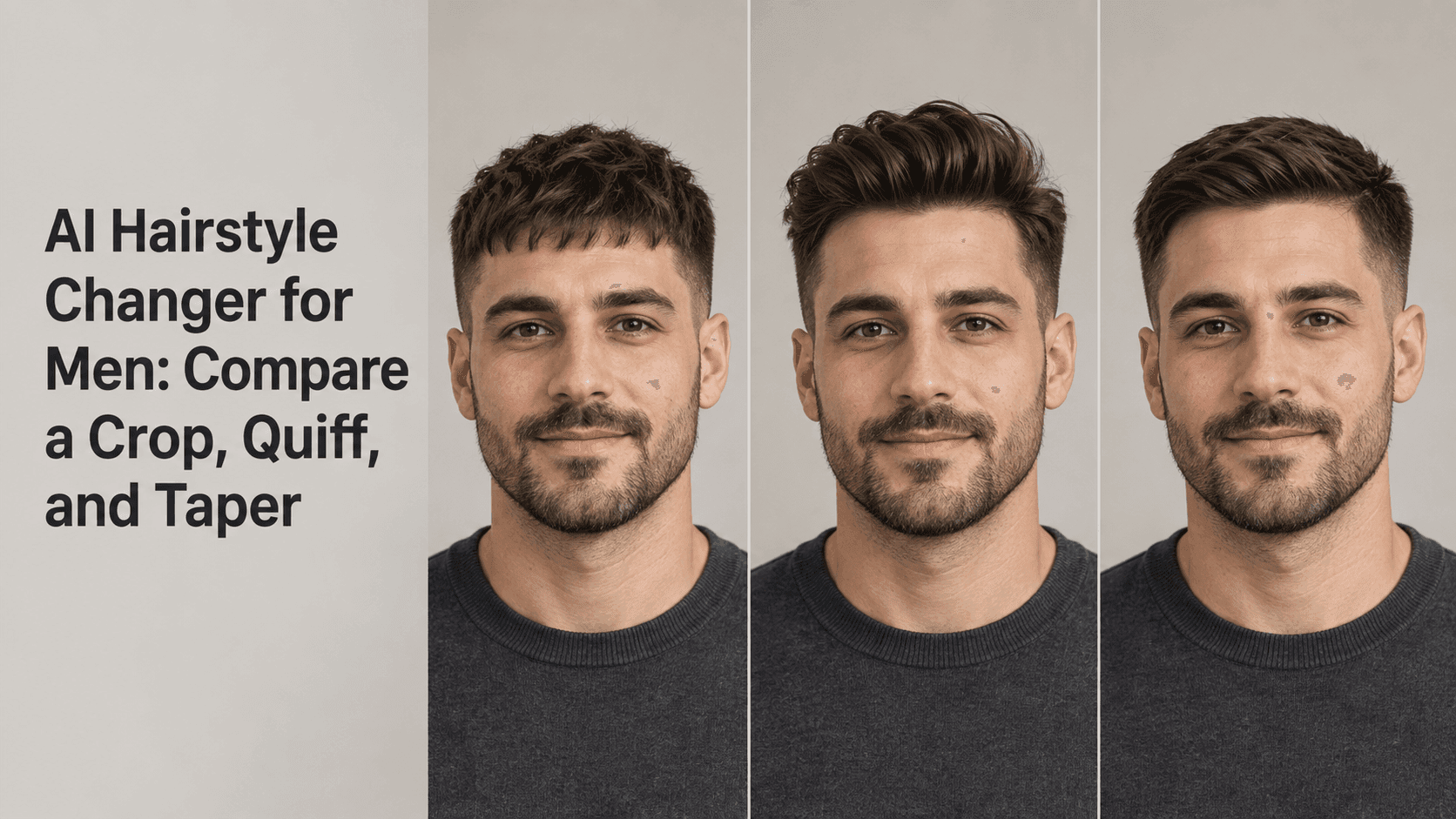
AI Hairstyle Changer for Men: Compare a Crop, Quiff, and Taper
AI Hairstyle Changer for Men: Compare a Crop, Quiff, and Taper
A crop, quiff, and taper can all look like “short hair” in a list of haircut names, but they create different shapes around the forehead, temples, and sides. An AI Hairstyle Changer for Men lets you preview those differences on your own portrait before deciding what to ask a barber for. Use the same photo for each look, and keep the face, hair color, and lighting steady so the cut is what you are comparing.
An AI Hairstyle Changer for Men is a way to look at options, not to hand the decision over to an app. The goal is not to find a haircut that an app declares perfect. It is to narrow down a few options and notice what you like: a fringe across the forehead, more height on top, or a cleaner outline around the sides.
Use an AI Hairstyle Changer for Men to Compare Shape
Start with a clear, recent photo taken from the front or at a slight angle. Make sure the forehead, temples, and sides of the hair are visible. A harsh shadow or a hat can hide the very details that distinguish a crop from a quiff or taper.
For an AI Hairstyle Changer for Men comparison to be useful, keep your source photo consistent. If you use one selfie for the crop, another for the quiff, and a third for the taper, changes in camera angle or expression can affect what you think of each style. An AI Hairstyle Changer for Men works best as a visual comparison when the base portrait stays the same.
Reveedo’s hairstyle tool lets you upload a portrait, browse hairstyle options, and create previews. Choose the closest available looks for your comparison, then check the results against the original. Use the AI Hairstyle Changer for Men as a first look at shape, not a final instruction for a barber. The preview is a reference image; it cannot promise exactly how a barber’s cut will sit on your hair.
What a Crop, Quiff, and Taper Actually Change
A crop usually keeps the top relatively short and brings a fringe forward or slightly to one side. Compare this outline with the quiff in your AI Hairstyle Changer for Men preview. When you try it in an AI Hairstyle Changer for Men, notice whether the fringe is textured or cut into a sharper line. Depending on the version, the outline may look textured and casual or clean and close. If you like hair that does not need much height, the crop is a useful one to preview.
A quiff puts more attention on the front and top. With an AI Hairstyle Changer for Men, compare a modest lift with a taller version if both are available. An AI Hairstyle Changer for Men preview can help you judge how much height feels comfortable. The hair is lifted or swept back, so the forehead may look more open and the top silhouette taller. In a preview, check whether that added height still feels like something you would style on an ordinary morning.
A taper describes how the hair gets shorter around the sides and neckline. In an AI Hairstyle Changer for Men, compare that outline with the top style you chose. It can be paired with different tops, including a crop or quiff. That means “taper” is not always a completely separate style from the other two. When using an AI Hairstyle Changer for Men, look at the outline near the temples and neckline as well as the hair on top.
These names cover a range of cuts. Barbers may use them a little differently, and your hair texture and growth pattern will affect the final result. Use the preview to explain the shape you have in mind, not as a substitute for discussing length and blending with your barber.
Keep the Comparison Fair
Try one look at a time from the same portrait. This gives the AI Hairstyle Changer for Men fewer unrelated details to vary. Keep your hair color, face, facial hair, clothes, and background consistent. If the crop preview also changes your beard and the quiff preview changes your jaw, you are no longer comparing just the cuts.
An AI Hairstyle Changer for Men may alter small details around the hairline while creating a new shape. Check the temples, fringe, and edges above the ears in each AI Hairstyle Changer for Men result. If a style makes your hairline look suddenly different, do not treat that as part of the haircut unless you asked for it.
Take note of what each AI Hairstyle Changer for Men preview changes:
- Does the fringe cover more of your forehead?
- Does the quiff add height that you would actually style?
- Does the taper clean up the sides without making them look shaved?
- Do the hairline and sideburns still look like yours?
- Does the top look plausible with your hair texture?
Looking at all three options at the same size helps too. A zoomed-in quiff may seem more dramatic than a crop shown as a thumbnail. Put the images next to each other before choosing a favorite.
Choose a Photo That Shows the Hairline
A front-facing photo in soft daylight is a good starting point for an AI Hairstyle Changer for Men. Avoid strong backlighting, heavy filters, or a high camera angle that hides the sides. If your current hair is long enough to cover your temples, tuck it back gently for the source image without flattening it unnaturally.
Do not use an old photo if your hairline or facial hair has changed since then. The point of an AI Hairstyle Changer for Men is to help you picture a possible style on your current appearance. That is why the date and clarity of the photo matter. A recent, sharp image gives you more relevant details to judge.
If you wear glasses, keep them on in all versions. If you normally have a beard, use a photo with it. These details affect the overall impression and help you see how the haircut works with the look you actually have.
When the Preview Changes More Than the Hair
Sometimes the crop comes back with a different forehead, the quiff changes the face shape, or the taper softens the sideburns. Compare the result with the original before deciding you like it. A careful AI Hairstyle Changer for Men preview should still look like the same person. If the face has shifted, try again with a clearer source photo or choose a less dramatic hairstyle option.
An AI Hairstyle Changer for Men creates an interpretation from the photo and selected style. It can show a direction, but the AI Hairstyle Changer for Men cannot account for every detail of your real hair. It does not know how your hair feels, how thick it is, where it naturally parts, or how much time you want to spend styling it. A high quiff may look convincing in a still image but need more product and blow-drying than you want in daily life.
Treat the image as a way to start a better conversation. You can show a barber the front and side shape you like, then ask how much length to leave on top, how close to cut the sides, and how the transition should blend. Those details matter more than the haircut label alone.
Take the Shortlist to the Barber
Save the one or two previews that feel closest to your everyday style. The AI Hairstyle Changer for Men is easier to use when you have a small shortlist. Rather than saying only “I want a taper,” point out whether you like the cleaner neckline, the length above the ears, or the way the top sits. If the quiff feels too tall but you like the swept direction, say that. If the crop feels right but the fringe is too blunt, mention it.
An AI Hairstyle Changer for Men is most useful when it helps you describe what you want in concrete terms. The final cut still depends on your hair, your barber’s technique, and how you style it at home. An AI Hairstyle Changer for Men can help you explain preferences, but it cannot decide the exact fade or length for you. Use the preview to make the appointment conversation easier, then choose the version that feels realistic for your routine.