



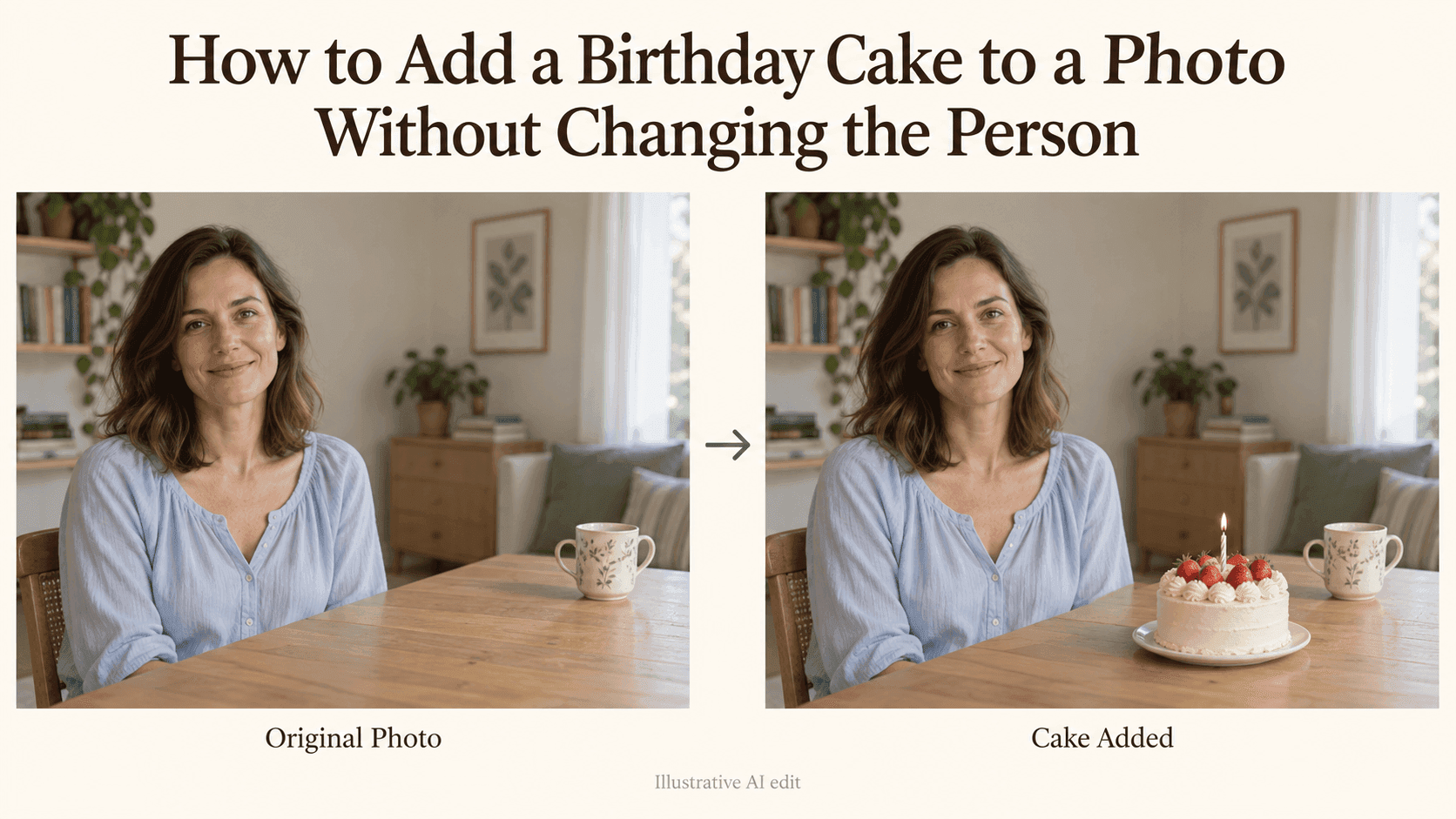
How to Add a Birthday Cake to a Photo Without Changing the Person
How to Add a Birthday Cake to a Photo Without Changing the Person
You find a photo you actually like. Your expression looks natural, your hair is fine, and the background isn’t too distracting. It would make a good birthday post if there were a cake somewhere in the picture.
The trouble starts when a small request turns into a much bigger edit. The cake appears, but so does a different smile. Your shirt changes. A hand that was resting on the table is suddenly holding a plate.
If you want to add a birthday cake to a photo, the job is to give the cake somewhere to sit while leaving the person alone. That sounds obvious, but it helps to make the request just as specific.
Before you add a birthday cake to a photo, find a place for it
Look at the photograph before choosing the cake.
Is there an empty patch of table? A sideboard behind you? A low coffee table in the foreground? Use a surface that already exists if you can.
For example, a seated portrait with a clear space beside a mug gives you a straightforward instruction: put the cake beside the mug. A tightly cropped selfie gives you much less to work with. There may be nowhere to place a cake without inventing a table, extending the frame, or covering part of your body.
You can still experiment with that selfie, but it is no longer a small edit. If you have another photo with a little more room, start there.
Hands are worth thinking about here. “Have me hold a birthday cake” asks the editor to change your pose as well as add an object. If keeping the original person is the priority, leave their hands where they are.
A prompt you can start with
In Reveedo’s AI Image Editor, you can upload an existing photograph and describe the change in words. The editor also accepts instructions about what should remain unchanged, though those instructions do not guarantee identical details.
For a portrait taken at a table, try:
Place a small birthday cake on a white plate in the empty space beside the mug. Use plain cream frosting and one unlit candle. Keep the person’s face, expression, hair, hands, clothes, and pose unchanged. Preserve the existing room, camera angle, and lighting. Do not add other decorations.
Change “beside the mug” to a location that actually appears in your photograph.
The unlit candle is deliberate. It lets you judge the cake and its placement before asking for a flame or warmer lighting. Likewise, plain frosting is enough for the first attempt. You don’t need to decide on cherries, ribbons, lettering, and candle colors before you know whether the plate sits properly on the table.
Check the face before admiring the cake
Once the image is generated, look at the person first.
It’s tempting to zoom straight into the frosting. But the cake can be perfect while the edit quietly changes the eyes or redraws the mouth.
Open the source and result at roughly the same size. Compare the smile, eye shape, hairline, glasses, and any visible hands. Look at clothing details too. A missing button or a changed neckline tells you the edit has reached beyond the area you wanted to change.
If the face has drifted, don’t keep that version just because the cake looks good. Return to the original and simplify the request. Move the cake farther from the body, remove extra decorations, or choose a photo with more empty space.
Repeatedly editing an already altered face can take you farther from the portrait you liked in the first place.
Does the cake belong on that table?
Now look at the plate.
Its angle should make sense on the tabletop. If the photograph looks down onto the table, you should see an appropriate amount of the plate’s upper surface. A plate shown from a completely different angle will look inserted, even if you can’t immediately explain why.
There should also be some contact between plate and table. A bright gap underneath can make the whole thing appear to float. A small shadow close to the plate may help it feel grounded, but a heavy black outline usually won’t.
Compare the cake with something nearby. A cup, chair, or existing plate gives you a rough sense of scale. If the cake dominates a casual portrait, ask for a smaller one rather than changing the whole composition.
A focused correction could be:
Make the cake smaller while keeping its design. Place the plate flat on the table, with perspective matching the tabletop and a subtle contact shadow underneath. Do not alter the person or the rest of the scene.
Use this only for a version where the person already looks right.
Candlelight doesn’t need to change the room
A lit candle can be a nice finishing detail. It can also become an excuse for the editor to turn a daytime picture into a dark restaurant scene.
Look at the original light first. If one side of your face and the nearby furniture are brighter, the cake should fit that setup.
Then, if you want a flame, keep the request modest:
Light the single candle. Keep the room at its original brightness and preserve the lighting on the person. Add only a faint warm glow immediately around the flame.
A little flame in a bright room doesn’t need to cast orange light across the entire face.
Sharpness matters as well. In a softly focused phone photo, an extremely crisp cake may look out of place. Ask for the cake to match the surrounding image rather than making everything sharper.
Leave the birthday message until the picture works
Names and ages are easier to deal with after you’ve chosen the image.
If you need exact spelling, add the message using a text tool. A small caption beside the portrait is simpler than lettering on the cake, where the words also need to follow the surface and perspective.
There’s no requirement to add text at all. A cake and one candle may already say enough.
Save the original separately, along with the finished edit. If you share the image, a brief note that it’s an AI birthday edit makes its purpose clear.
One final distinction: asking an AI editor to preserve a face is not the same as locking those pixels. If the person must remain completely untouched, use a layer-based editor to place a separate cake image into the scene without editing the person’s area.
For an ordinary birthday post, a carefully checked result may be enough. The important thing is that the cake feels like an addition to a photograph you love, not a reason to replace the person in it.